
Tomorrow's lesson is planned, but the practice handout still needs questions, enough writing space, and an answer key that works. An AI worksheet generator can draft that handout from a grade level and a topic or reading passage. The useful result comes from a teacher-owned loop: lock the objective, generate the draft, solve and correct the key, then prepare a supported version before printing.
The teacher still decides what students should practice and what counts as evidence of learning. A polished page isn't a finished instructional resource until those decisions are visible in the questions.
What to Set Before You Generate
Before opening the Worksheet Generator, the teacher should write the learning objective in plain language. Create equivalent fractions using multiplication gives the draft a clearer boundary than fractions review.
Next, lock the settings to the classroom task rather than the broadest possible coverage.
Worksheet setup before you generate
| Setting | Choices on the public form | Use it when |
|---|---|---|
| Grade | Pre-K through 12th grade, plus University and Adult education | The class's actual level, not the hardest version of the topic |
| Question count | 5, 10, or 15 | An exit check, a short practice block, or longer independent work |
| Item type | Mixed, Short answer, Fill in the blank, or Matching | Variety is useful, or students need one consistent way to respond |
| Source | Topic, pasted text, or TXT or Markdown import where upload is offered | Skill practice starts from a topic, or items must stay inside one reading |
For an illustrative planning choice, five questions might fit an exit check, ten a short practice block, and fifteen longer independent work. University and Adult education belong only to groups outside K–12.
Match the source to the job
A topic gives the generator room to create practice examples. Pasted text sets a narrower boundary when answers must come from an assigned reading; ReadLab's guide to digital tools for better reading retention offers related reading-comprehension context.
Word-list assessment belongs in the Vocabulary Quiz Maker, while general topic or standards quizzes belong in the Multiple Choice Quiz Generator. For choosing among other preparation tasks, the guide to AI tools for teachers provides broader context without changing this worksheet's objective.
How to Generate and Save the Worksheet
The workflow has three broad phases: select content, review the draft, and keep the finished handout. These practical moves add the account, privacy, and file-handling decisions needed to complete those phases.

Prepare the request
-
Sign in and check the limit. Generation and saving require a registered free account, and daily generation limits apply. The teacher should note the limit displayed on the tool page before preparing a stack of handouts. Student names, identifying details, and personal information should be removed from any pasted material because generated results may retain content from the input.
-
Select the content and settings. Choose the grade, question count, and item type, then enter a focused topic or paste the exact reading. TXT or Markdown import should be used only in a field that displays an upload control. For passage-based work, the teacher should include the relevant excerpt rather than unrelated material that could pull questions away from the objective.
A useful topic entry identifies the skill, the boundaries, and anything the sheet should exclude. For example, a teacher preparing a multiplication-based fractions handout can specify equivalent fractions and exclude addition or subtraction.
Practical rule: A topic describes the subject. An objective describes what students must do with it.
The source also needs enough context to support the expected answer. If a reading question asks students to explain a character's decision, the pasted passage must contain the event and the evidence needed for that explanation.
Generate, revise, and keep the result
-
Generate the worksheet and answer key. The teacher should wait for the complete result before evaluating it. Response time depends on the request, service availability, and connection, so the lesson shouldn't depend on an instant result. If generation fails or the key is incomplete, narrow the topic to a single objective and generate again before rebuilding the entire sheet manually.
-
Read the result as editable material. Change unclear wording, cut questions that test another skill, and adjust difficulty before accepting the answers. A short-answer question may require an explanation that students haven't practiced, even when its computation is appropriate. The teacher should also check whether a Mixed sheet adds useful variety or merely changes the response format without improving practice.
-
Keep the reviewed handout using the available actions. Results can be edited, saved to resources, copied, downloaded as a TXT file, or printed. The teacher should choose the action that fits the next use: resources for retrieval, copy for further document editing, TXT for a text file, or print for the classroom handout.
A clear filename combines grade, topic, and the lesson date. Standard and supported versions should have distinguishable endings, while the teacher's answer-key copy should be easy to identify.
Saving a worksheet doesn't automatically insert it into a planbook. If the period also needs a teaching sequence, the teacher can prepare that separately and keep the worksheet as the handout.
The clean handoff is a reviewed file, not a collection of unfinished drafts. Before leaving the tool, the teacher should confirm that the kept version contains the intended questions and the corrected key.
The Grade 5 Fractions Sheet Example
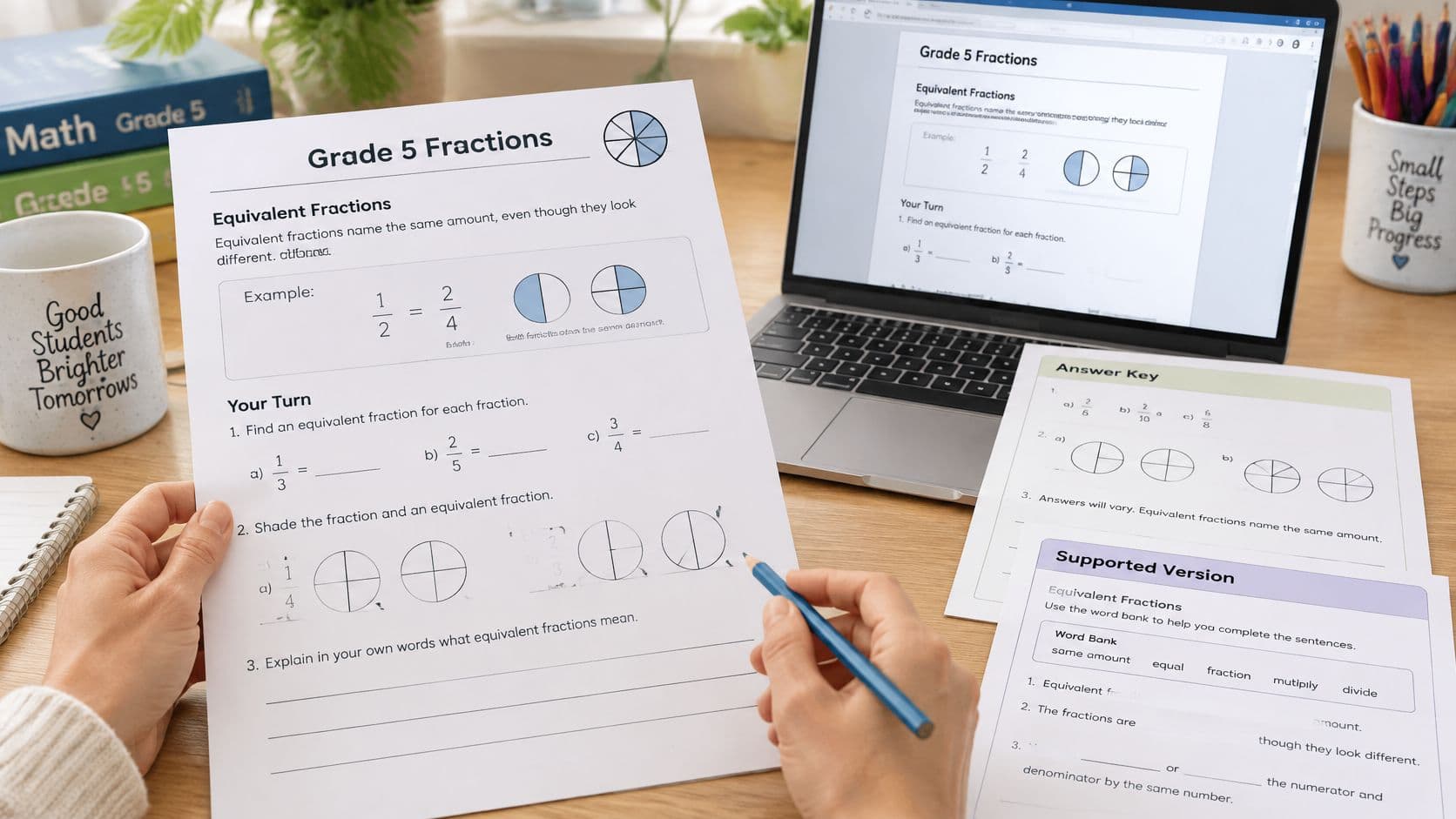
Illustrative classroom example: A fifth-grade teacher has a 25-minute practice block. The objective is creating an equivalent fraction by multiplying the numerator and denominator by the same number.

The teacher selects Grade 5, 10 questions, and Mixed, with the topic equivalent fractions using multiplication, denominators to 12. Sample draft items include (1/3 = __/12), an explanation of why (2/5 = 4/10), and a matching set of fractions and multipliers.
Make the keep-or-rewrite decisions
After solving every item, the teacher rewrites a faulty pair that treats (2/4) and (1/3) as equivalent. Two wordy stems become single sentences, and questions about adding fractions are deleted because they change the target.
The standard sheet keeps eight items: four computations, two show-the-multiplier items, and two short explanations. The supported copy changes access while retaining the same title and objective.
Standard and supported fractions sheets
| Element | Standard sheet | Supported sheet |
|---|---|---|
| Objective | Create an equivalent fraction by multiplying numerator and denominator | Same objective |
| Items | 8 | 6 |
| Word bank | None | Multipliers 2, 3, and 4 |
| Worked example | None | One example at the top |
| Response modes | Compute and explain | Compute, circle the multiplier, and complete one sentence frame |
A co-teacher can recognize the shared skill immediately. The same objective-first editing approach also applies to a division worksheet: keep questions that measure the target, and rewrite or remove those that don't.
Review the Draft Before Students See It
A correct-looking worksheet can still contain an incorrect key, an ambiguous question, or a reading demand that obscures the intended skill. AI-generated content is a draft, not a replacement for professional judgment; the teacher must check facts, answers, difficulty, and wording before distribution.

Run the classroom review checklist
- Objective visible. The title or directions identify the skill, and every item measures it. On the fractions sheet, an addition problem doesn't belong merely because it also contains fractions.
- Directions readable. Students can identify the action without another explanation. A matching task needs to say what gets matched, and a written response needs to identify what students should explain.
- Answer key checked independently. The teacher solves each problem without looking at the generated key, then compares results. Open-ended items need acceptable-answer criteria, not just a single sample sentence.
- Vocabulary appropriate. Academic terms match instruction already given. An unfamiliar term should be defined or removed unless understanding that term is itself the learning target.
- Reading faithful to its source. Questions, quotations, and expected answers stay within the pasted passage. The teacher's copy records the source of quoted or adapted material.
- Identifying information removed. Neither the prompt nor the handout retains student names or other identifying details. Generic classroom scenarios can replace personal examples.
- Printed page usable. Students have room to calculate, label, or explain. Headings match the task, and unnecessary graphics or crowded answer lines don't compete with the work.
Use errors to strengthen explanations
A wrong key is also a clue about a misconception the item might reinforce. Treating (2/4) and (1/3) as equivalent can suggest that changing both numbers is enough, even when they aren't changed by the same factor.
The teacher should rewrite the explanation to show that multiplying the numerator and denominator by the same number preserves the fraction's value. The corrected item must then require that relationship, rather than reward guessing from the appearance of the numbers.
If the teacher wouldn't put their name on the answer key, the sheet isn't ready to print.
The U.S. Copyright Office's AI registration guidance states that copyright protects human-authored expression, so substantial teacher choices and edits matter when a worksheet will be published or reused beyond ordinary classroom preparation. When ownership matters, teacher-created explanations, organization, diagrams, and revisions should remain distinguishable from untouched generated material.
For an ordinary school day, the practical standard is direct: accurate content, a dependable key, suitable wording, and a page students can complete.
Adapt One Worksheet for More Learners
Once the answer key is correct, the teacher can prepare a supported copy without changing the learning target. The classroom decision is whether a student needs different access to the task, not whether that student should practice an unrelated skill.
CAST's Universal Design for Learning framework organizes access through engagement, representation, and action and expression, and emphasizes that no single representation or response method works best for every learner. For a worksheet, that means adjusting how students encounter information and show understanding while preserving the objective.
Build support into the actual item
In the illustrative fractions pair, the standard page asks students to compute and explain. The supported page uses the same multipliers, but adds a word bank, a worked example, and a sentence frame.
A usable supported item can look like this:
Supported item example
Complete (1/3 = __/12).
Circle the multiplier: 2 | 3 | 4
Complete the sentence: I multiplied the numerator and denominator by __.
The teacher's key identifies the missing numerator as 4 and the multiplier as 4. The sentence frame sits directly beneath the computation so students don't have to search elsewhere for the language support.
The worked example at the top can show (2/5 = 4/10), with the same multiplier marked beside both numerator and denominator. A vocabulary note can define equivalent as having the same value, followed by that example.
Chunked directions separate the actions: complete the fraction, identify the multiplier, and explain the relationship. Fewer items per page can provide more working space without making the mathematics easier.
Check access without changing the target
The teacher should use these checks before printing both versions:
- Understand the task. Students can locate the directions and recognize what to do. Headings and repeated item layouts should reduce searching, not introduce extra instructions.
- Access the content. A word bank, purposeful model, or defined term removes an unnecessary barrier. A small area model is useful only if it matches the fraction in the item.
- Show the skill. The response still demonstrates equivalent-fraction reasoning. Circling a multiplier can support that evidence, but shouldn't replace the computation when computation is part of the objective.
Other subjects call for different response options. Students might circle textual evidence, label a diagram, complete a small organizer, or write a brief explanation, provided the response measures the intended skill.
These adjustments can help elementary students, multilingual learners, and students receiving special education services. The guide to ways to differentiate instruction offers related planning approaches when the support needs extend beyond a handout.
The teacher should remove a sentence frame when students no longer need it for the same objective. The clearer teacher-edited version should replace the first generated layout, rather than remain an optional extra beside it.
Print Tomorrow's Worksheet and File It
The next preparation task is one finished handout for a real lesson, not a folder of possible worksheets. The teacher should select the standard or supported copy for the class, confirm the corrected answer key, and check that the page leaves enough room for the planned responses.
Keep the teaching copies together
Standard and supported files should stay together with the teacher's key. That makes either version available for the same lesson without another generation request.
- Choose the worksheet action. Print, copy, or download the handout from the worksheet tool itself.
- Choose the planning action separately. Printing a day, week, month, or available outline view produces planning pages, not the worksheet file.
- Record the handout location. Add a planbook note naming the file and where it was saved, so tomorrow's lesson points to the correct material.
A useful note might read: Equivalent Fractions Using Multiplication. Standard and supported copies saved together; corrected key kept with teacher materials. The note connects the lesson to the resource without retyping the questions into the plan.
The supported copy only needs to be made when a learner needs that access. The final preparation action is to print the reviewed version for the next period, with the answer key checked by the teacher who will distribute it.
Teacher Planner combines a browser-based planbook with AI drafting tools for lesson plans, worksheets, quizzes, adapted texts, and writing feedback. Visit Teacher Planner to prepare one objective-focused worksheet, revise its answers, and keep the finished handout alongside the next lesson's planning.