
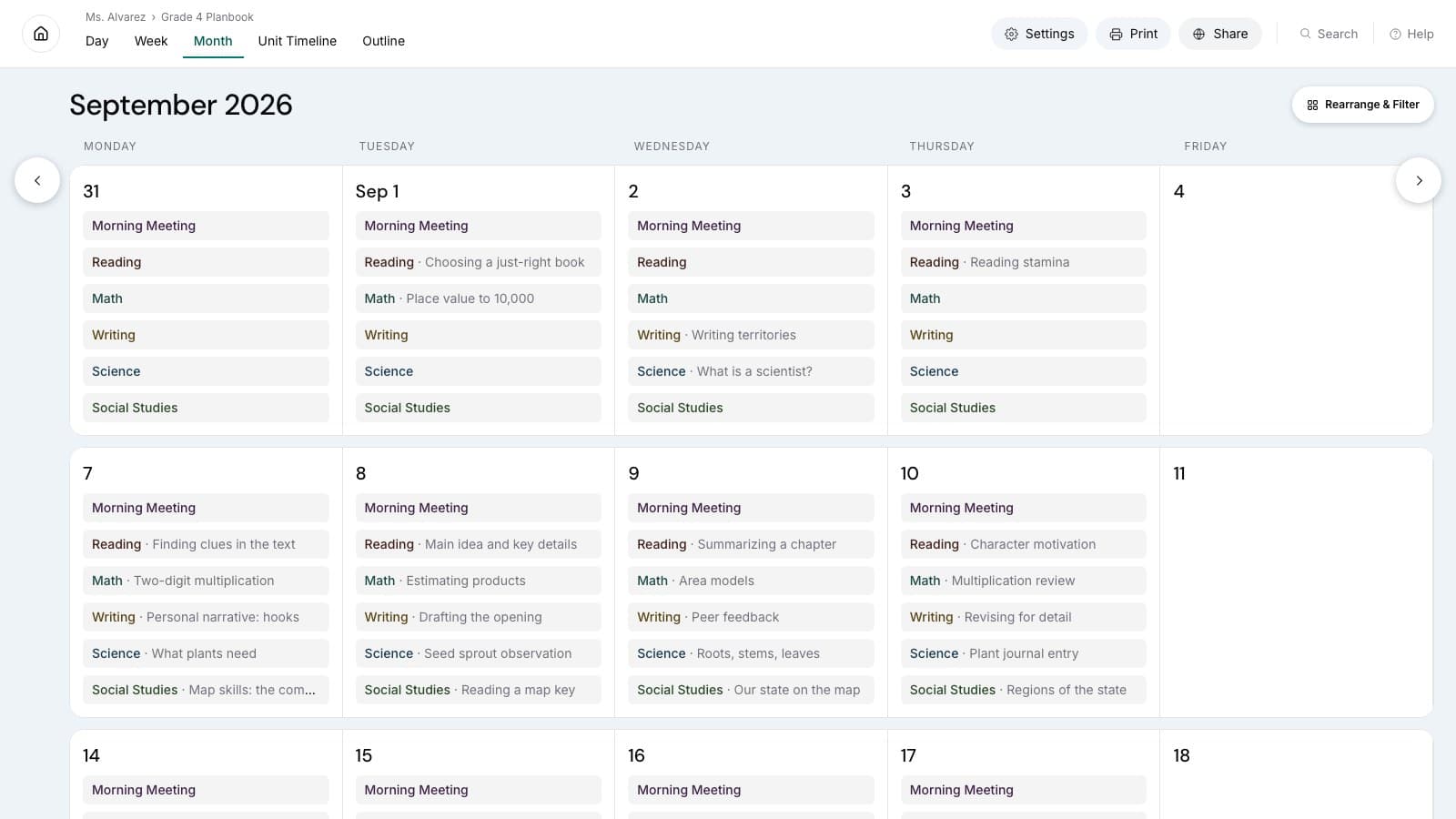
A teacher planner is a working system for turning a school calendar, curriculum goals, and changing class schedules into lessons that can actually be taught. It gives a teacher one reliable place to see what should happen over the year, what each class needs this week, and what must be prepared for the next lesson.
That definition matters because a teacher planner is often confused with the individual tools around it. A calendar can show that an assembly is happening on Tuesday. A lesson plan can describe Tuesday's activity. A gradebook can record what students completed. A learning management system can distribute the materials. The teacher planner connects those pieces so that a change in one place leads to a sensible adjustment everywhere else.
The best system is not necessarily the one with the most fields. It is the one a teacher can keep current during a real school week. This guide explains what belongs in a teacher planner, how it differs from adjacent tools, and how to choose a format without building a second job around planning.
A teacher planner connects the whole school year
School planning happens at several speeds at once. The year has fixed dates, reporting periods, holidays, and major curriculum goals. A unit may run for several weeks. A teaching week needs enough detail to coordinate several classes. A daily lesson needs a clear objective, useful materials, and a realistic next step. A teacher planner connects all four views.
Imagine a teacher with three preparations: two sections of the same course, another course on a rotating schedule, and a short advisory period. The annual calendar shows that one section will lose a lesson to an assembly while the other will not. The unit map shows both sections are expected to reach the same assessment by the end of the month. The weekly plan makes the difference visible. The daily plan records which lesson can be shortened, combined, moved, or assigned in another form.
Without that connection, the teacher has to reconstruct the consequences from memory. A note on a calendar does not automatically answer which class is now behind. A folder of detailed lesson plans does not show whether the remaining days can still support the unit goal. A useful teacher planner keeps the sequence visible, so the teacher can make a deliberate choice instead of discovering the conflict at the classroom door.
This is also why a planner should preserve context. “Lesson 4” is not enough if nobody can tell which unit it belongs to, which standard or objective it supports, or what happened in the previous meeting. The planner does not need an essay for every class, but it should make the next decision understandable.
What belongs in a teacher planner?
A practical teacher planner usually contains five kinds of information. They can live on separate screens or pages, but they should work together.
- Calendar constraints. Add school closures, testing windows, assemblies, trips, reporting deadlines, professional learning days, and known schedule changes. These are not lessons, but they determine how many usable lessons exist.
- Courses and class schedules. Record which groups meet, when they meet, and whether the timetable rotates. A planner for one daily class can be simple. A planner for several preparations or alternating days needs a structure that prevents the wrong lesson from appearing on the wrong date.
- Units, objectives, and standards. Capture the larger destination before listing activities. A unit title, a small set of learning objectives, and the standards addressed are usually enough to keep daily work connected to the curriculum.
- Weekly and daily lesson details. Note the objective, essential activity, materials or links, checks for understanding, homework when applicable, and the next action. The level of detail should match what the teacher needs to teach and revise the lesson.
- Review notes. Record what moved, what needs reteaching, which materials should be improved, and what must carry into the following week. These notes keep the plan honest after the classroom changes it.
Useful systems also make recurring work reusable. A lab may use the same safety reminder and preparation checklist. A discussion lesson may repeat the same broad structure. Reusing that structure saves time while leaving room to change the question, text, or objective. Reuse should reduce repetitive entry, not force every lesson into an identical template.
The planner should remain selective. Student grades, confidential notes, attendance records, and full resource libraries often belong in systems designed for those purposes. A teacher planner may link to them, but copying everything into one document makes the planning view harder to maintain and may create unnecessary privacy risks.
Teacher planner vs. calendar, lesson plan, gradebook, and LMS
These tools overlap, but each answers a different primary question.
| Tool | Primary question | Typical contents |
|---|---|---|
| Teacher planner | What should I teach, when, and how does it fit? | Year map, units, weekly sequence, daily lessons, standards, adjustments |
| Calendar | What is happening at a particular time? | Events, meetings, deadlines, closures, reminders |
| Lesson plan | What will happen in one lesson? | Objective, activities, resources, assessment, timing |
| Gradebook | What evidence of learning has been recorded? | Assignments, scores, feedback, reporting categories |
| LMS | What do students need to access or submit? | Materials, announcements, discussions, quizzes, submissions |
A teacher may use all five. The distinction is not about replacing school systems. It is about choosing a planning home. If the assembly appears only in the calendar, the teacher planner should still reflect its effect on the lesson sequence. If an assignment is delivered through the LMS, the planner can link to it without duplicating every instruction. If the gradebook shows that a concept needs attention, the next week's plan can include a reteaching step.
This division also prevents a common failure: using a calendar as a lesson database. Calendar boxes become crowded quickly, recurring schedules are difficult to compare, and moving one event may hide how it affects a unit. At the other extreme, a collection of beautifully detailed lesson documents can make the weekly sequence hard to scan. A teacher planner sits between the overview and the detail.
Four planning horizons: year, unit, week, and day
The four-horizon model is a simple way to decide where information belongs.
Year planning starts with constraints and destinations. Mark non-instructional days, term boundaries, major assessment windows, and broad curriculum coverage. The result is not a promise that every lesson will happen on a fixed date. It is a capacity map: there are only so many teaching days, and some periods are more interrupted than others.
Unit planning turns that capacity into a sequence of learning. Define what students should understand or be able to do, identify the evidence that will show progress, and outline the major lesson stages. Keep enough flexibility for a unit to expand or contract when the calendar changes.
Weekly planning is the coordination layer. It shows each class meeting side by side, exposes gaps between sections, and makes preparation work visible. This is where a teacher can notice that Wednesday requires three different sets of materials or that Friday's shortened schedule cannot support a full lab.
Daily planning supports teaching in the room. It should make the objective and flow easy to find, with direct access to materials. A short, current daily plan is more useful than a long document that describes an earlier version of the lesson.
Information should move in both directions. The year and unit views guide the week; the daily experience updates the week and may reshape the unit. If a discussion needs another day, moving it should reveal the downstream effect. If a class moves faster, the planner should help use the available time intentionally rather than simply adding unrelated work.
Paper, spreadsheet, or online teacher planner?
Paper planners are immediate, flexible, and pleasant for teachers who think well by writing. They work without a device and make it easy to sketch an entire week. Their limits appear when a schedule changes repeatedly: lessons must be erased or rewritten, links are awkward, and the same structure may need to be copied many times.
Spreadsheets are adaptable and familiar. Rows can represent dates, columns can represent classes, and filters or colors can make patterns visible. They are useful when a teacher is willing to design and maintain the structure. As the planner grows, merged cells, formulas, separate tabs, and copied templates can become fragile. A spreadsheet stores information well, but it does not automatically understand lessons, units, or rotating schedules.
An online teacher planner can connect dates, courses, units, standards, and lessons as related information. It can make rescheduling cleaner, reuse structures, place links beside lesson details, and produce a printable view when paper is useful. The tradeoff is that the workflow must be quick enough to use every day. A complicated digital planner can create more administration than it removes.
The right choice depends on the work. A teacher with one stable preparation may prefer a paper week spread. Someone coordinating several courses, standards, reusable lessons, and frequent schedule changes may benefit from a purpose-built digital system. Hybrid use is also reasonable: organize and revise online, then print the week for a substitute folder, planning meeting, or screen-free classroom reference.
If digital planning fits your situation, this comparison of online teacher planners explains the questions worth asking before choosing a product. The goal is not to find the longest feature list. It is to find the smallest reliable system that matches your schedule.
A practical teacher planner checklist
Use this checklist to evaluate a new planner or simplify an existing one.
- Can you see the school-year constraints before committing to unit dates?
- Can the system represent every course and the actual meeting pattern?
- Can a unit connect to its objectives or standards without repeating them in every lesson?
- Can you scan one teaching week across multiple classes?
- Can you move a lesson without losing its content or sequence?
- Can you distinguish planned work from what was actually taught?
- Can you reuse a lesson structure while editing the details?
- Can you attach or link the materials needed at teaching time?
- Can you print or export a useful view when required?
- Can you review the week and carry unfinished work forward?
- Can you maintain the system in a few focused minutes rather than rebuilding it each day?
- Does the planner avoid storing sensitive student information it does not need?
Do not treat every “no” as a reason to replace a tool. A missing function matters only when it creates recurring friction. If a paper planner handles the week well and rescheduling is rare, it may already be enough. If moving lessons between several classes consumes time every week, that is a stronger signal that the system and the work no longer match.
Start with the system you can maintain
A teacher planner succeeds when it stays close to reality. Begin with the dates that cannot move, the classes that actually meet, and the next unit you need to teach. Add only the detail that helps you prepare, teach, or make a decision. Review the plan after the week changes it.
Avoid building an elaborate taxonomy before using the planner. One consistent place for units, one weekly view, and a brief daily lesson structure are enough to start. After several weeks, recurring friction will show which additions are valuable. Perhaps standards need a clearer connection. Perhaps printing matters more than expected. Perhaps copying a recurring lesson structure would remove repetitive work. Let observed needs shape the system.
Most importantly, treat the plan as editable. A teacher planner is not a record of perfect predictions. It is a tool for keeping the next useful action visible while the school year moves. If you want to see how a purpose-built system connects calendar dates, weekly lessons, standards, schedule changes, and printable plans, explore Teacher Planner and compare that workflow with the system you use today.