

One classroom arrangement rarely supports every lesson equally well. Rows can help students follow a carefully sequenced explanation, while clusters make peer talk easier, and stations create room for differentiation. The strongest classroom configuration ideas treat furniture as an instructional tool, not a permanent decision. The right setup depends on the learning task, student needs, movement requirements, accessibility, and the support model adults will use.
The 10 configurations below compare practical features, benefits, drawbacks, classroom scenarios, and manageable implementation steps. They also account for transitions, because a layout that works during a mini-lesson can create noise, blind spots, or blocked pathways during independent work. Planning the sequence in advance matters. Teacher Planner can help map lessons, rotations, standards, materials, and schedule changes without acting as an LMS or gradebook.
1. Traditional Rows for Teacher-Led Instruction
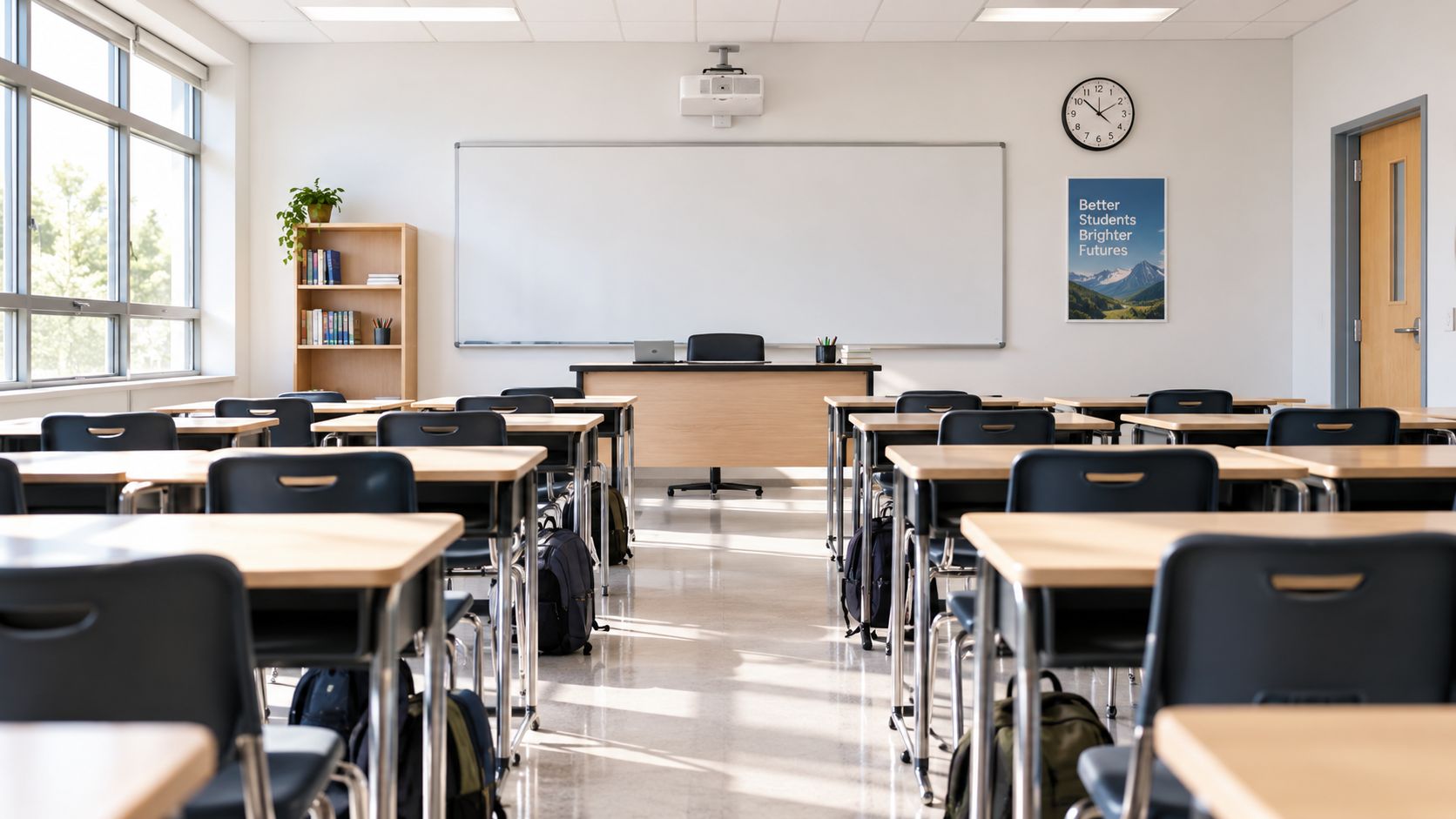
Straight rows facing the front remain useful when the teacher needs a shared focal point. Students can see the board, follow a demonstration, complete independent practice, or listen to direct instruction without turning between groups. Rows also preserve floor space and make sight lines predictable.
This configuration works well for a short grammar explanation, explicit phonics instruction, a mathematics worked example, or a test-preparation session. It can also suit many special education resource rooms where students need clear modeling, reduced visual competition, and frequent teacher checks.
Rows have limits. They discourage spontaneous peer exchange, make collaborative work feel like an interruption, and can position the teacher as the only source of knowledge. Historical classroom design shows why this arrangement became common. From 1870 to 1914, industrial-era schools standardized fixed desk rows and raised teacher platforms to use space efficiently and manage large enrollments, as described in this history of classroom design.
Practical rule: Use rows for the part of the lesson that needs concentration, then change the arrangement when students need to explain, create, or compare.
Use Teacher Planner's Day and Week views to organize sequential, teacher-led lessons. Keep the layout for core instruction rather than the entire day, and use Bump Forward when an assembly or cancellation shifts a lecture without breaking the lesson sequence. A printed Minimal plan also gives a substitute a clear linear sequence to follow.
2. Clusters for Collaborative Learning
Clusters place desks in small inward-facing groups, commonly with three to six students. The arrangement makes it easier for learners to share materials, rehearse ideas, and solve a problem together while the teacher circulates. It suits guided reading rotations, STEAM challenges, Reader's Workshop, Writer's Workshop, and inclusion classrooms where co-teachers need to move between groups.
The main trade-off is accountability. Students can talk more easily, but they can also talk off task more easily. A cluster facing away from the board may require students to twist their bodies during whole-class instruction, and supply access can become a bottleneck if every group needs the same materials at once.
Set clusters so each student has a reasonable view of the board and a clear route to leave the group. Assign roles such as facilitator, recorder, materials manager, and reporter when the task requires sustained cooperation. Change group membership deliberately rather than allowing the same social patterns to become permanent.
A controlled room-design study found that a centered classroom layout increased total student talk, while task success was higher in a traditional forward-facing room; off-task talk did not differ materially. The comparison of centered and forward-facing classroom configurations supports choosing clusters for discussion and collaboration, not assuming they improve every task.
Use Teacher Planner's Unit Timeline to plan group rotations and the Week view to review collaboration patterns. The figurative language lesson resource can support a cluster-based lesson where groups analyze language, explain evidence, and present interpretations. Use the AI Worksheet Generator for differentiated group materials and print station cards for each cluster.
3. U-Shape or Horseshoe Configuration
A U-shape is a teaching tool for lessons that move between explanation, questioning, discussion, and presentation. Students face the teacher and board while retaining a partial view of their classmates, making the arrangement suitable for English, social studies, philosophy, seminars, and blended resource-room instruction.
The open center provides space for demonstrations, student presentations, and teacher movement. That space reduces the room available for desks, however. Corner seats can create awkward sight lines, while students at the far ends may feel detached from the conversation. Deep desks or a narrow opening also restrict safe movement.
The IRIS Center recommends a U-shaped layout for classes of 20 or fewer students. Larger classes may require several smaller U-shapes. Its guidance on classroom traffic flow and arrangement calls for clear walkways, blind-spot checks, and furniture positioned away from circulation routes. Check these details before teaching. They affect transitions, supervision, emergency drills, and access for students using mobility aids.
“The open space is an instructional zone, not storage.”
Use the U-shape for discussion-heavy lessons, then switch to forward-facing desks or groups when the sequence requires independent work, collaboration, or sustained teacher modeling. Treat the layout as temporary infrastructure rather than a permanent furniture plan. Teacher Planner's Week view can pair seminar lessons with direct instruction, while Outline view helps place discussion within the wider sequence. Generate prompts with the AI Lesson Plan Generator, print facilitator notes using the Cards template, and reserve the center for standards-aligned presentations.
4. Station Rotation and Learning Centers
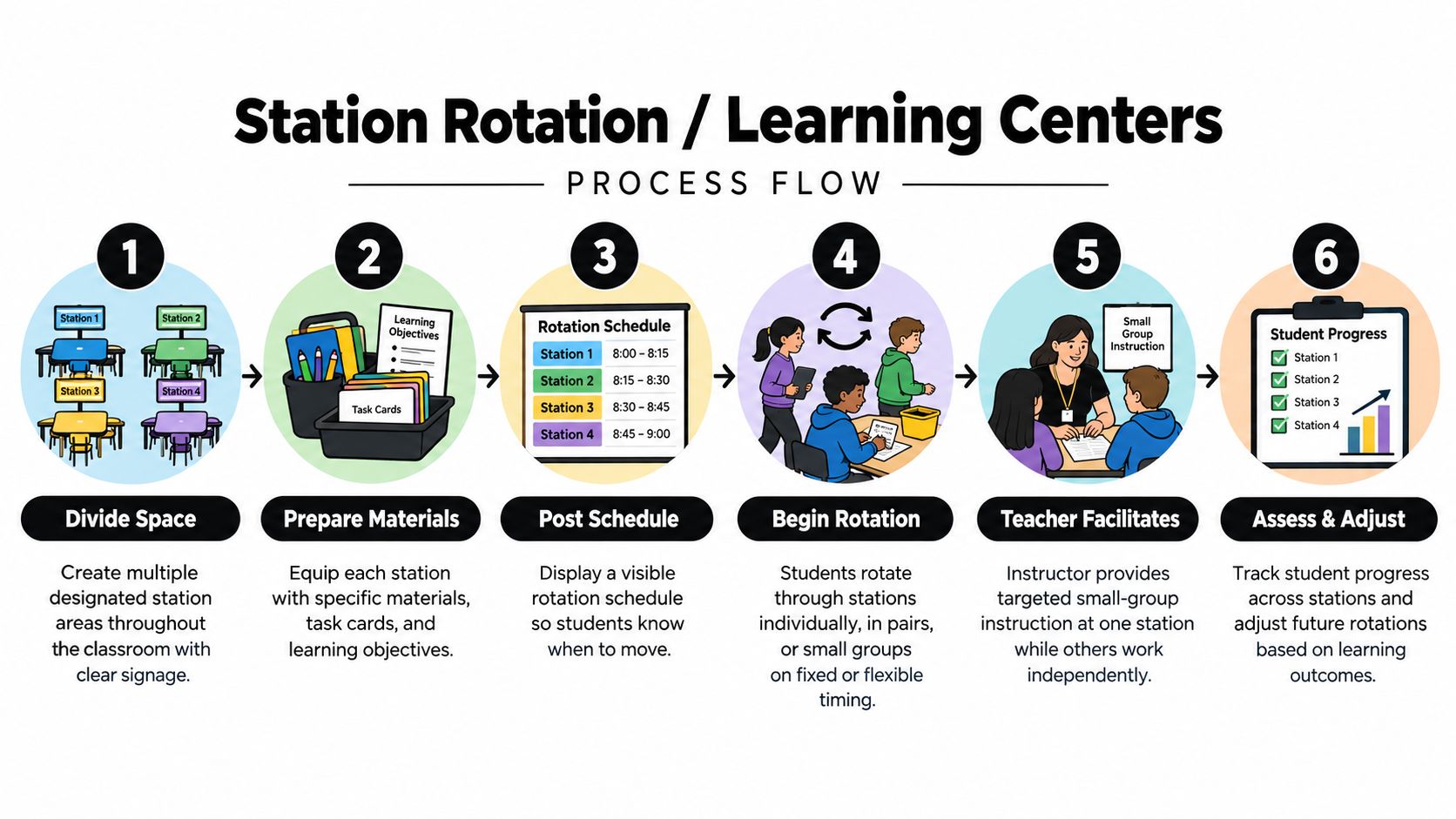
A station layout divides the classroom into distinct activity areas. Students may work independently, with a partner, in a small group, or directly with the teacher while other stations run at the same time. This structure supports literacy centers, mathematics rotations, guided reading, STEM activities, and inclusion models with co-teachers or paraprofessionals.
Stations offer strong differentiation because the teacher can vary the text, scaffold, product, or level of support without stopping the whole class. They also expose weak routines quickly. If students don't know where to go, what to collect, how to ask for help, or how to reset a station, the room becomes a series of interruptions.
Place the teacher-led station where supervision remains possible across the room. Keep high-use supplies at the point of need, separate noisy and quiet tasks, and post a visible rotation path. Begin with fewer stations than you ultimately want, then add complexity after students can transition without repeated verbal directions.
- Teacher station: Reserve the clearest instructional area for targeted feedback or modeling.
- Independent station: Choose work students can complete without constant adult intervention.
- Reset station: Include a simple process for returning materials and preparing for the next group.
Teacher Planner's Week view can assign groups and activities to specific days, while the Unit Timeline can map a recurring cycle. Use the AI Worksheet Generator for station-specific materials and print them as task cards. The lesson plan outline example is useful when each station needs a concise objective, procedure, material list, and success check. The Standards Tracker can reveal whether every rotation serves the intended objective rather than merely keeping students occupied.
5. Flexible or Open Classroom Layout
An open layout uses lightweight, movable furniture and deliberately protected floor space. Instead of assigning every desk a fixed position, the teacher establishes work zones that can shift from a mini-lesson to independent practice, partner work, or making. Montessori classrooms, makerspaces, innovation labs, and small learning pods often use this approach.
Flexibility helps when the schedule changes frequently or the lesson contains several modes. It can also create student ownership, provided students understand that choice comes with responsibility. Without explicit routines, however, open space becomes wasted space, furniture movement becomes noisy, and students spend more attention choosing where to work than completing the task.
Start with a small number of permitted configurations. Mark furniture locations subtly, store unused pieces against a wall, and teach students how to move one item at a time. Keep a consistent accessible route through the room, including when tables or stools shift.
Plan each block in Teacher Planner's Day view, noting the required configuration and the time needed to change it. The Week view can show recurring setups for assistants and students. Use the AI Lesson Plan Generator to describe activity flow and space requirements, then print a Minimal weekly plan for quick reference. Bump Forward is especially useful when an interruption changes the order of activities, because the room can adapt without requiring a permanent furniture reset.
6. Lecture Theater with Tiered Seating
Tiered seating places students in raised rows, usually with unobstructed views of the instructor and presentation surface. It suits university lecture halls, medical and law teaching, professional development rooms, and other large-group settings where the teacher must address many learners at once.
The configuration solves one problem very well: visibility. Students can usually see the board and speaker without heads blocking the view. It doesn't solve participation. Fixed seats restrict movement, make pair work awkward, and can separate students from materials or support staff. Accessibility also requires careful attention to entry routes, seating locations, and evacuation procedures.
Use tiered seating for content-heavy teaching only when the lesson includes deliberate interaction. Insert brief pair-shares, polls, retrieval prompts, demonstrations, or exit tickets so students must process the content rather than only receive it. A lecture outline should show these pauses as part of the instructional design, not as optional extras.
A lecture room needs planned participation because the furniture won't create it for you.
Teacher Planner's Day and Week views can sequence lecture blocks, while Outline view helps locate transition points across a content-heavy unit. Generate a structured outline with the AI Lesson Plan Generator and print it in the Classic template for note-taking guides. If a school event compresses the schedule, Bump Forward can move the lecture while preserving the order of later lessons.
7. Makerspace or Studio Layout
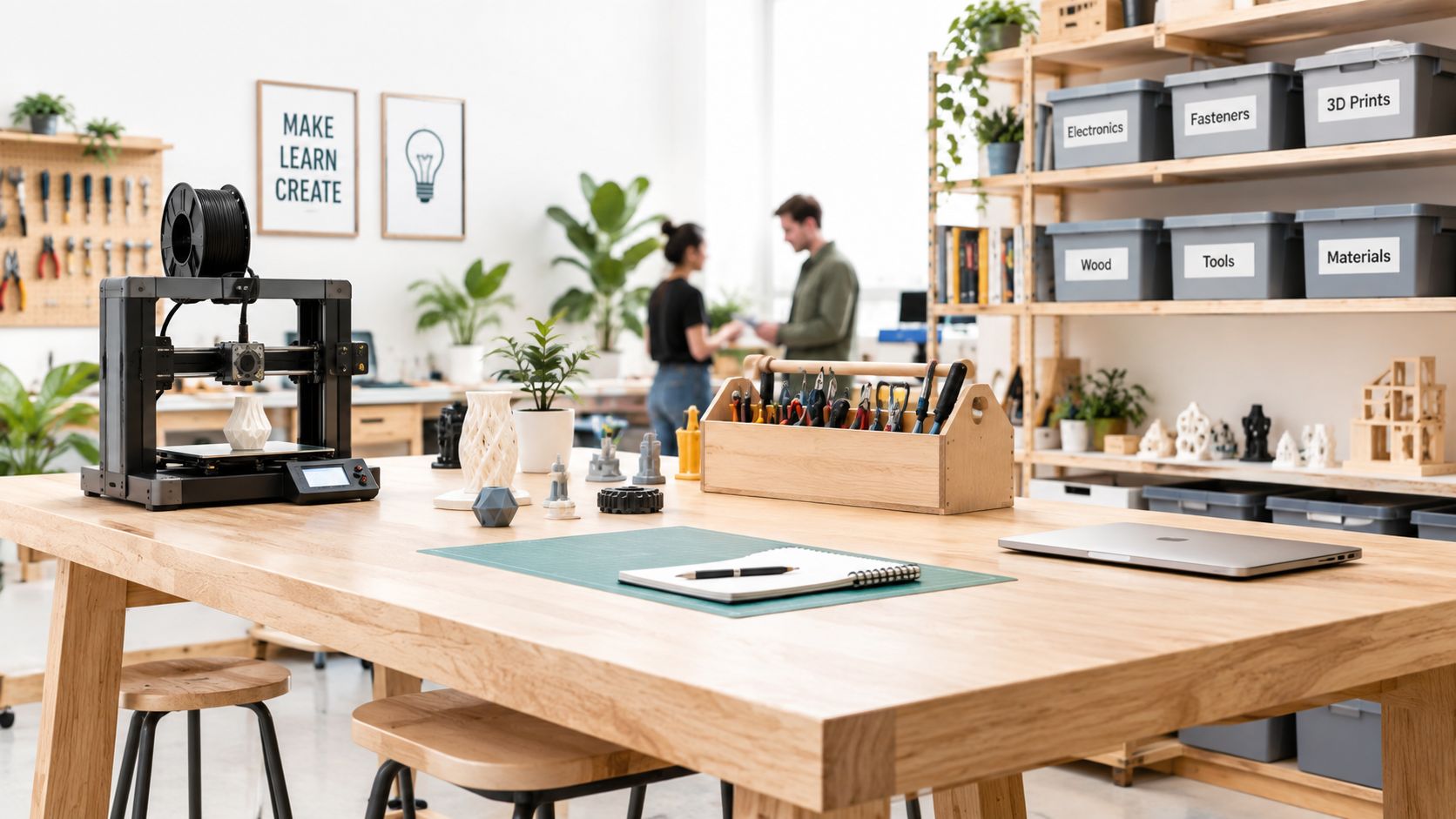
A makerspace is organized around work rather than one shared direction. It may include tool stations, digital work areas, wet and dry zones, storage, prototyping tables, and an open area for assembling or testing. School makerspaces, CTE labs, library programs, and STEAM classrooms need this configuration because students move through processes instead of just receiving information.
The strongest studio layouts make tools visible but controlled. Students should know where materials live, which surfaces are suitable for cutting or wet work, and how to return equipment. The cost of poor zoning is practical: queues form around popular tools, unfinished projects spread into walkways, and the teacher can't monitor every risk area at once.
Plan the project backward from its milestones. A design challenge might move from question and sketch to prototype, test, revision, and reflection. Each phase may need a different area, and not every student needs access to every tool at the same time.
- Tool access: Schedule shared equipment so groups don't cluster around one station.
- Storage: Label unfinished work by group or project stage.
- Reflection: Reserve a visible area for documentation, critique, and next steps.
Use Teacher Planner's Unit Timeline to map multi-week projects, then use Week view for tool access and material preparation. The Lesson Plan Generator can draft standards-aligned design challenges and checkpoints. Print project briefs in the Cards template for station use, review sequencing in Outline, and adjust milestones with Bump Forward when materials or tool availability changes.
8. Pod or Neighborhood Arrangement
Pods divide a classroom into distinct neighborhoods, each with seating, materials, and a defined focus. One pod might work with the teacher on decoding, another might complete a supported reading task, and a third might practice independently. This structure is common in intervention rooms, inclusion classrooms, multi-grade learning environments, and intensive small-group teaching.
The configuration makes differentiated instruction visible and manageable. Adults can take responsibility for specific pods, and students can work at different levels without the teacher pretending that every learner needs the same task. The risk is labeling. If pod membership permanently signals ability, students may internalize a hierarchy or lose access to varied peers and challenges.
Use neutral names, rotate groups when appropriate, and vary the work attached to each pod. Design each area so students can receive help without disrupting the others. A pod should have enough workspace for its actual task, not a collection of unused furniture that narrows pathways.
Create separate Teacher Planner planbooks for groups or adults when that reflects the way instruction is delivered. The Week view can show each pod's activity and support assignment, while the AI Worksheet Generator can produce differentiated materials. Print pod-specific cards, track objectives in the Standards Tracker, and use Bump Forward when one group needs additional time. Shared planbooks help co-teachers coordinate without relying on last-minute verbal updates.
9. Theatre or Performance Space Configuration
A performance configuration establishes a clear presentation area and audience seating. The stage may be a marked section of open floor rather than a raised platform. Drama, music, debate, public speaking, student demonstrations, and performance-based projects all benefit from a visible distinction between performer and audience.
The arrangement supports attention and rehearsal discipline, but it can make the audience passive. Students who aren't performing need a listening, observation, or feedback job. The room also needs a transition plan for moving from rehearsal groups to audience formation without losing time or creating unsafe congestion.
Keep performance routes open and decide where performers wait, where materials are stored, and how students enter and exit. For music rooms, instrument placement and cable management matter as much as seating. For debate or presentations, arrange audience seats so every listener can see the speaker and any displayed evidence.
Use Teacher Planner's Unit Timeline for rehearsal milestones and performance dates. The Week view can distinguish rehearsal, peer feedback, performance, and reflection days. Generate rubrics or prompts with the AI Lesson Plan Generator, print rehearsal schedules, and review the full sequence in Outline. If a school event changes the date, Bump Forward can preserve the relationship between preparation and performance.
The audience needs a job. Observation notes, peer feedback, and reflection turn watching into learning.
10. Asymmetrical or Varied Seating Layout
Varied seating combines several arrangements in one room. It may include a small row section for direct instruction, clusters for collaborative work, individual desks for focused practice, floor cushions for reading, and standing tables for students who work better while upright. The purpose isn't visual variety. It is to give different tasks and learners an appropriate place to work without rebuilding the room each time.
This arrangement can support inclusive classrooms, workshop models, Montessori environments, and special education settings with diverse sensory, physical, and attention needs. It also creates a management challenge. Students need to know which areas are available, what behavior belongs there, and how the teacher will ensure that attractive or comfortable options don't become reserved for a favored group.
Define each zone by function, not status. A floor area can support reading or planning, but it shouldn't become the only place for students who need movement. Check that every student can reach materials, see required displays, and leave the room safely. Track access over time so flexibility doesn't become inequity.
Use Teacher Planner's Day view to note the seating area for each block and the Week view to show recurring patterns. A simple printed diagram helps substitutes understand why the room looks different from a standard layout. Establish movement procedures, create visual references, and use the AI Lesson Plan Generator to specify seating needs within a lesson. Because the room doesn't require a full reset, it can absorb schedule changes more easily when you use Bump Forward.
10 Classroom Configurations Compared
| Layout | Implementation complexity | Resource requirements | Expected outcomes | Ideal use cases | Key advantages |
|---|---|---|---|---|---|
| Traditional Rows (Teacher-Centered) | Low, simple setup and maintenance | Minimal, fixed desks, clear sightlines | Efficient whole-class delivery; low peer interaction | Lectures, test prep, large classes | Space-efficient; easy monitoring; low disruption |
| Clusters or Groups (Collaborative Learning) | Moderate, requires arrangement and routines | Moderate, movable desks, space between pods | Increased collaboration, engagement, peer learning | Cooperative learning, PBL, small-group work | Promotes discussion; supports differentiation; teacher circulation |
| U-Shape / Horseshoe Configuration | Moderate, needs space planning | Moderate, flexible desks, open center | Balanced teacher-student interaction; good presentations | Seminars, discussions, student presentations | Strong sightlines; fosters whole-class dialogue |
| Station Rotation / Learning Centers | High, extensive setup and management | High, multiple stations, materials, signage | High differentiation; student autonomy; targeted small groups | Early elementary rotations, guided reading, STEAM labs | Personalized learning; maximizes materials use; targeted instruction |
| Flexible / Open Classroom Layout | High, frequent reconfiguration and routines | High, mobile furniture, storage solutions | High adaptability; varied modalities within a day | Project-based learning, makerspaces, multi-grade settings | Rapid reconfiguration; student choice; supports varied instruction |
| Lecture Theater with Tiered Seating | Low–Moderate, fixed infrastructure | High, tiered seating, AV systems, large room | Clear sightlines; efficient content delivery; limited interaction | Large-enrollment lectures, demos, higher ed | Excellent visibility; large capacity; multimedia ready |
| Makerspace or Studio Layout | High, safety, maintenance, tool management | High, tools, materials, ventilation, storage | Enhanced creativity, prototyping skills, hands-on learning | STEAM, CTE, project-based, maker programs | Fosters innovation; interdisciplinary projects; high student agency |
| Pod / Neighborhood Arrangement | High, planning, clear rotations, routines | High, multiple kits, dividers, assigned staffing | Targeted small-group instruction; reduced distractions | Special education, intervention, co-teaching | Enables parallel activities; tailored support; co-teaching friendly |
| Theatre / Performance Space Configuration | Moderate, stage area and scheduling | Moderate, performance tech, flexible seating | Improved presentation and performance skills | Drama, music, debates, presentations | Authentic performance context; audience engagement; arts integration |
| Asymmetrical / Varied Seating Layout | Moderate, design intent and established routines | Moderate, diverse furniture types and storage | Accommodates diverse needs; simultaneous work modes | Inclusive classrooms, workshop models, neurodiverse groups | Flexible choice; supports varied learners; reduces reconfiguration needs |
Choose the Configuration You Can Sustain
The best classroom configuration isn't the one that looks most creative. It's the one that supports the dominant instructional mode while remaining workable for the students, adults, and routines in the room. Choose rows when students need direct modeling and independent concentration. Choose clusters when peer explanation is central. Use a U-shape for discussion, stations for differentiated rotations, a studio for making, and varied seating when one room must support several learning modes.
Class size changes the decision. A U-shape may work well with a small discussion group but become unwieldy in a larger class. A station model can provide strong differentiation, but only when students can move safely and complete work without constant rescue. A pod arrangement may help co-teaching teams, while tiered seating can solve visibility problems in a large lecture room but requires more deliberate participation design.
Accessibility should be checked before aesthetics. Walk every route with the actual needs of your learners in mind. Look for narrow gaps, blocked exits, difficult turns, glare, blind spots, and seating that prevents a student from participating fully. Independent guidance on movement, line of sight, and disruption control highlights why clear walkways and monitoring points deserve as much attention as discussion style.
The physical environment has measurable relevance to learning. A major University of Salford study found that classroom design explained about 16% of the variation in pupils' academic progress, with light, flexibility, and complexity among the strongest design factors. The University of Salford classroom design study also reported that classroom factors accounted for about 9.3% of reading progress, 8.4% of writing progress, and 11.7% of math progress. Those findings don't identify one universal layout. They reinforce the need to match space to learning conditions.
Start with one manageable change. Move from rows to clusters for one recurring collaborative block, or add a quiet individual-work area without redesigning the entire room. Teach how to move, where to collect materials, how to reset a space, and how to seek help. Then observe whether the change improves participation, access, focus, and transitions.
Teacher Planner can make the operational side easier. Use Day view for the exact configuration and materials required, Week view for recurring rotations, Month view for broader patterns, Unit Timeline for multi-week sequences, and Outline for checking lesson order. Link plans to standards, use AI generators for editable drafts and differentiated resources, and print Classic, Minimal, or Cards formats for students, assistants, or substitutes. When assemblies, cancellations, or schedule changes occur, Bump Forward helps preserve the instructional sequence.
The right question isn't, “Which layout is best?” Ask, “Which arrangement makes this lesson easier to teach and easier for these students to access?” If the answer changes across the day, your classroom configuration should change too.
Teacher Planner brings schedules, lessons, units, standards, materials, and AI drafting tools into one browser-based planbook, making it easier to plan configurations and transitions alongside instruction. Use it to map recurring layouts, prepare differentiated station materials, print clear plans, and adjust sequences when the timetable changes. Visit Teacher Planner to organize the classroom routines behind your next configuration.